Thursday, July 30, 2009

GTAQ Conference 2009 - Using Spatial Technologies in the Geography Classroom

Spatial technologies have been the buzz word in Geography for a number of years now. We have all tried at some stage to attempt to implement some form of spatial technologies in our classroom with varying degrees of success. The main impediments to the introduction of these technologies have previously been issues with time and cost.

However, this is no longer the case. The importance of spatial information has meant that there are a large number of free, online sites available for use to access and use. The wonderful thing about these sites is that there is minimal preparation needed, and they are generally easy to use (as long as you have the internet!).

This presentation will provide an overview of what spatial technologies are, why you should use them and how they can be used in the Geography classroom. Specific time will be spent on various sites, including Google maps. I will also show you some maps my students have created following a coastal field trip.

So, why are spatial technologies needed in the classroom?

Improving spatial literacy among our students is important. The National Geographic-roper Public Affairs (NG-RPA) 2006 Literacy Study found that six in ten young Americans aged 18 to 24 could not find Iraq on a map of the Middle East; one-third could not find Louisiana on a map of the United States; and most incredibly, when given a hypothetical map and told they could escape an approaching hurricane by evacuating north-west, one-third would travel in the wrong direction.

The image below may provide humorous (but not really!) evidence of this.


Before we start looking at sites, we must understand what spatial technologies are. The slideshow below was one that I have put together and uploaded to slideshare.


Funny Movies about GPS


Google Maps and Streetview


Examples of Online Spatial Technologies

The following link will allow you to view and download a document that contains heaps of online resources that you can use in the classroom. We will look at some in more detail today.


MapZone
This would have to be the best online GIS site that is available free for students. The activities are clear and engaging, and introduce the students the idea of what GIS is and how it works. The following link - Creating Our Own Digital Landscape - is an example of how I used Mapzone in the classroom.

Sentinel Hotspots
Sentinel is a national bushfire monitoring system that provides timely information about hotspots to emergency services managers across Australia. The mapping system allows users to identify fire locations with a potential risk to communities and properties.

FluTracker
This map and the data behind it were compiled by Dr. Henry Niman, a biomedical researcher in Pittsburgh, Pennsylvania, using technology provided by Rhiza Labs and Google. The map is compiled using data from official sources, news reports and user-contributions and updated multiple times per day. A great tool to track the outbreak of swine flu.

US Crime Reports.com
This map provides detailed crime statistic data for cities in the US. A great tool to look at patterns and the prevalence of differing types of crime. A pity Australia hasn't put something like this together.

Google Maps


Google Maps is developing into one of the most amazing and accessible sites for Geography teachers to utilise. Using Google Maps you are able to create your own maps using My Maps, add text and images to a point, and then email this tour to someone else.

The following link will take you to a task I created for my Unit 1 (equivalent to Year 11) Geography class - Bec's Classes - Coastal Fieldwork: Your Assessment Task. Using images and data collected from the fieldtrip, my students created their own map. An example of a student's assessment task can be viewed by clicking here - Coastal Fieldtrip Google Map by Stephanie Kosth.

A new Google Map application is the Scribble Map. This allows the user to draw on a google map, place markers and text, create a custom widget, save the file and then send it to friends. The application of spatial brainstorming and sketching in class, saving the file and then uploading it to a blog or the intranet is real.

Your Task

Create a Google Maps 'My Map' of a trip around your local area. As you will not have any photos, use Flickr and the url of these images to practice linking images to a point. The following You Tube movie provides a step-by-step overview of how to create your map. Thanks to Mick Law from Contour Education for creating this.


As an alternative, you could create your own 'Love Map'. See below.


Google Earth also provides a number of opportunities for your class, including the creation of tours. Any maps you create with Google Maps are interchangeable with Google Earth. Mick Law from Contour Education has also put together resources on how to use Google Earth in the Geography classroom. Google Earth Resources for Geography Teachers provides a multitude of resources for Geography teachers on how to use Google Earth in the classroom. This site was established and maintained by a UK Geography teacher.

Other Resources

Mapping Worlds
This site allows you to view various interesting pieces of data (death penalty, women in parliament, cattle etc) with a slightly different perspective. You will be shown a map that changes the size of each country according to its value of that data.


Twittervision 3d
This site is spatial technologies meets Web 2.0. It displays the real time location of tweets from around the world. Very interesting to use if you are looking at the spread of news on geographical issues.

Other resources can also be found on previous blog posts of this blog.

GTAQ Conference 2009: Using Web 2.0 Technology in the Geography Classroom

Today's workshop will provide an overview of some of the technologies I have discovered and how I use them in the classroom. Following a short presentation on what Web 2.0 is, and some of the online tools available, I will show you some of my examples. Then we will set up our own blog, embed You Tube links and look at some other tools that could come in handy.

This year I began teaching at Coburg Senior High School. The school has a unique open plan design which incorporates learning commons rather than classrooms. Student and staff learning is enhanced by an IT rich environment. We do not use textbooks and there are no whiteboards. Teachers therefore need to find ways of teaching that both enhance student learning and use the technology that is provided. So, my challenge this year was to find a way to use some of the Web 2.0 Technology so that is effective in the classroom. My experience is quite limited, and I have learnt by watching other teachers at school, trial and error and using teacher blogs from other schools.

What is Web 2.0?

The following You Tube provides an overview of how Web 2.0 has changed the internet.


The presentation above was something that I created. You can then embed this in your blog using a program called Slideshare. Become a member and then upload your powerpoints. This then allows you to clearly display the content on your blog.


There are new Web 2.0 Tools and Applications popping up everyday. It does become quite daunting trying to keep up with what could be useful to use in applying Web 2.0 tools in the classroom. One site, GO2Web2.0 provides a link to all types of tools and applications. You can search these via category or purpose.

Your Task

Following the You Tube movie and presentation, what do you understand about Web 2.0 and the applications it has in the classroom? Using a wordle, brainstorm your ideas.

A wordle is a toy that allows you to create word clouds from the text that you provide. Instructions on how to create a wordle
can be found by clicking on here.

An example of a lesson where I used a wordle can be found here.


Blogs


I have found blogging to be one of the best Web 2.0 tools available to me in the classroom. As a beginner, this was the easiest way to embed and link files, as well as provide instant access for my students. A blog also allows students to comment. There are a number of options available if you are interested in creating a blog for you class. Possible sites that I know teachers use are Edublogs or Global Teacher.

The following is a link to my class blog - Bec's Classes. This is my main teaching tool and I usually put together a new post for each lesson.

Video Tutorials for Edublogs are found here


Embedding a Video in Your Blog


The ability to embed movies into a blog is one of the main reasons that blogging is so useful. In my experience You Tube does have the best videos available. I suggest that you subscribe to You Tube, so that you can save favourite videos, as well as upload your own videos to embed on your blog. One issue is that many schools do block access to You Tube. One option is to see if teachers only have access to You Tube so that you can show the video files on your blog. There are also other options available. These include:

The other issue is finding a video and only taking out the useful sections to embed on your blog. The following application - TubeChop - allows you to chop a funny or interesting section of a You Tube movie and embed it on your blog.

Your Task


Sign up and create a blog using a site of your choice. Once you have created your account, you will need to write your first post. You are to design a Geography lesson on Natural Hazards. This is the introductory lesson, and will need to provide a number of tasks and links. The minimum requirements of this task include:
  • embed a movie
  • upload a picture
  • create a number of links to various sites
Wikis


I have to admit that I am still not an expert on the use of the wiki. It is a wonderful collaboration tool for students when they are working on a project. It is also particularly useful as we do not have a textbook, and over time it allows both the students and myself to create the content and knowledge needed for senior subjects. The settings on a wiki can also be changed so that they are more private than a blog. This allows the only selected students from selected classes to add to them. Wikis are also great tools to use for professional learning teams. Some wiki platforms that you could use are PB Wiki or Wikispaces.

The following powerpoint provides an overview on how to create your wiki.


Podcasts


Podcasts are gradually becoming replaced by videos or vodcasts. However, there are still opportunities for you to subscribe to podcasts or vodcasts via an RSS feed. It is best to link to a Feed such as Google Reader so that you can subscribe to various podcasts and vodcasts. A lesson showing students how to subscribe to RSS Feeds can be found here - Getting Your News Online by Jess McCulloch.


Podcasts can also be recorded by you and uploaded to your blog. This can be done using programs such as Garageband and recorded on your computer. You can also use other applications that link recordings from your mobile phone directly to your blog. One example of this is a application called Utterli.

Other Resources and Tools


The following resources may be useful when putting together your blogs or wikis, or discovering new Web 2.0 technologies for the classroom.

Web2.0 for the Classroom Teacher

Kathy Schrock's Guide for Educators - Web 2.0 Tools
Directory of Educational Resources on the Web

Ning - An online social network that could work like a blog in your classroom. Some examples to have a look at in the education context include:
Ning in Education - Using Ning for Educational Social Networks
The Global Education Collaborative
David Rayner's Page Key Stage 3 Geography Ning

Great Teacher Blogs

Jess McCulloch - Notes to Self

Mr Robbo - The P.E Geek

Monday, March 16, 2009

The Crazy World of Twitter and Geography

Prior to this year, I had no idea what Twitter was, or how it worked. However, this new online digital landscape has provided another avenue for people to share their ideas. Twitter is a social networking and micro-blogging service that enables its users to send and read other users' updates known as tweets. Tweets are text-based posts of up to 140 characters in length.

It appears that most people don't really understand what twitter is. A funny overview from the Daily Show.


And why people love twitter....


And an even funnier version - The Trouble with Twitter....


So, what does Twitter have to do with Geography. As I have already discussed on a previous blog entry, 80% of all information on the internet is now stored spatially (by location). Where people 'twitter' and what they 'twitter' about, provides an excellent analysis of what is occuring in specific locations around the world. An example of this is the interactive Superbowl Twitter map put together by the New York Times. The relationships between what people were 'tweeting' about in relationship to the game, where they were 'tweeting' from, and what they 'tweeted' at each stage of the game could be discussed.

The combination of social media sites (Twitter, Facebook, Youtube) and locational information could prove to be a great relationship. The following article from Fortune Magazine Geography, Social Media and Breakfast highlights the movement towards representing the social media sites in a spatial way. The article discusses twittervision and its inventor, David Troy. Twittervision is a map that automatically updates with each tweet around the globe. The 3D version can be found at twittervision3D. (Along the same lines, check out Flickrvision using Flickr images and SpinvisionTv using YouTube).


As the article states, 'watching them (tweets) can quickly start giving you new thoughts about our common life with others on the planet'. Troy is working to take the concept further - to combine postings from Twitter, Flickr, Facebook and other services in a single geographic interface.

So, what does this have to do with your Geography teaching? In particular, the impact that Twitter and other social networking sites have had on providing up-to-date information on natural disasters and world events has been quite remarkable. Disaster managers are beginning to see the benefits of Twitter and other Social Networking sites in saving lives.


Another example is SickCity, a new twitter mashup that uses twitter to map and track human health.

Practical examples on how to use Twitter in your Geography classroom are also available. These ideas - Twitter Alter Ego Idea - has been taking from a Geography Teachers blog - Living Geography. Another awesome example is found on OllieBray.com, Using Twitter and Google Earth in the Classroom to Make the most of the weather. Finally, a great overview - Twenty-One Interesting Ways to Use Twitter in the Classroom.

So, be it a little crazy or confusing, there are some great applications for Twitter in the Geography classroom. So, here I go.... to join Twitter..... and begin tweeting away.

Sunday, March 1, 2009

Searching the Internet: Finding the Needle in the Haystack

Research is a large part of teaching humanities. However, 'Googling' a topic has now became a bad habit that I find I am often trying to wean my students away from. Google is a great search engine, and you can always find at least one or two sites, if you know how to search properly. However, finding one million hits when searching an environmental issue, is not efficient.

So, what do I do?

Firstly, I have been attempting to help my students search on Google effectively. The following Youtube clips will give you tips on how to search and research.


I have also discovered the following three search engines that provide a more visual, clustered or specific search on a topic. Used either together, or by themselves, I find these are much more effective in cutting down the search to something much more manageable for your students.

The first search engine is called Clusty. Clusty queries several top search engines, combines the results, and generates an ordered list based on comparative ranking. This "metasearch" approach helps raise the best results to the top and push search engine spam to the bottom. Clusty is unique because it groups similar results together into clusters. Clusters help you see your search results by topic so you can zero in on exactly what you’re looking for or discover unexpected relationships between items.

Visual Search: Search Me is a search engine that displays results not in the usual text-list format, but as a slick image gallery of actual Web pages you can flip through and filter results by topic. The site also allows you to narrow your search by looking at specific categories. I use this search engine myself, as a quick glance at the web page is useful. It is also a great search engine for those students who find a page full of text a little daunting. Search Me was listed as one of the 50 Best Websites of 2008, in the Time Magazine.

The Boolify Project: An Educational Boolean Search Tool is definitely one of my favourites. It is “an educational boolean search tool” that graphically depicts boolean or basic web searches. Users drag blocks depicting elements of search parameters (OR, AND or NOT) onto a display area and choose to a web (default), news or image search." The Boolify Project was established specifically for upper primary and middle school students; however, it is also a great tool for senior students. Teaching students to use 'and', 'or' and 'not' will also prepare students for many of the university data bases, if they choose to undergo further study. Boolify Yourself, an article in WorkLiteracy, provides an overview of how Boolify can be used in the classroom.

There are many more search engines available. It is a bit like choosing your favourite pair of shoes, whatever you feel like at the time... The Youtube below outlines some others that may be handy in the classroom....


So, check these out and let me know of any others by commenting below... Hopefully my students can find that research needle in the haystack.

Sunday, February 22, 2009

Spatial Technologies and Natural Hazards - Bushfire Mapping

I have been a little hesitant about posting on the Victorian Bushfires until now, simply because it was all too sad and too real here in Victoria. As a teacher, and particularly a Geography teacher, it was a topic that was spoken about in classes, but I really did need to think about what I was going to say, and how I was going to deliver this information. For most teachers in Victoria, and particularly Melbourne, we had students in our classroom who were either immediately affected, or knew someone who was affected by the bushfires.

I had Geography on the Friday prior to Black Saturday (7th February). I had no inkling of what was going to occur, but I was introducing the topic 'What is Geography?' to my students, so was showing them the Bureau of Meteorology site and the predicted extreme forecast for the weekend. We spoke about the weather conditions and why extreme fire danger was a real threat to most of Victoria. Following the weekend, a number of students recalled that discussion in class, and I did need to spend some time on it. The lesson was on 'Spatial Concepts', so the class was clearly able to identify spatial associations between Bushfire hotspots and the number of abnormally hot days in Victoria. It was a valuable lesson in the importance of Geography in everyday lives. The continuing news broadcast also displayed the importance of mapping and spatial technologies in both the fire fighting and recovery effort. Many of my students would turn up to school with footage from the news broadcasters that had topographic maps in the background, and online mapping tools as visuals.

So, in saying all of that, there are a number of interactive GIS maps out there on the internet that allow students to look at differing layers of natural hazard data. Following the Bushfires in Victoria, more of these sites emerged. Below, I have outlined some that I have used successfully in my Geography classes. My suggestion is to develop handouts for the students to complete as they look at these sites....

The World Natural Hazards Website provides a global view on natural hazards and disasters around the world. This site is structured like a true GIS based interactive map, allowing the user to turn on and off a number of layers. It also includes demographic data, infrastructure data and operates in real time. Using the Information tool allows the user to find out about specific hazards in specific regions. This site will not be as specific as more local or Australian based websites, but is great to have for the students when studying any natural hazards or disasters.


Sentinel Bushfire Mapping is produced by the CSIRO. This map provides an overview of the hotspots in Australia for the last 24 - 48 hours. The site has basic GIS applications and allows the user to turn differing layers on and off. This site has been inundated in the last few weeks, and therefore may be slow and a little bit out of date.


Google Victoria Fires Map uses RSS feeds from the Country Fire Authority to up-date the map. You can also look at the most recent satellite imagery from the fires. One of the reasons that Google Maps produced this site was to take the pressure off other CFA and Bushfire mapping sites. An article on the development of this map was written by CNet, Google Maps Track Deadly Australian Bushfires.


I found that the ABC News Bushfire Emergency Map, powered by Microsoft Virtual Earth, was also a great map to look at. This provided a little more detail on the human and infrastructure costs, and had links to current news events. This map was utilised by a number of people in the fire affected area. The ABC News site is also one of the best in terms of information about the disaster.


Using satellite imagery is, I believe, the best way to explain the extent and nature of a natural disaster such as bushfires to students. The NASA Earth Observatory is always my first port of call, providing excellent imagery as well as a detailed and easy to understand explanation of how the imagery was collected and what it shows. The most telling image would be the Image of the Day on February 5th - Exceptional Australian Heat Wave, February 10th - Bushfires in South East Australia, February 14th - Bushfires in South East Australia and February 18th - Killmore East-Murrindindi Complex South Fire, Victoria.

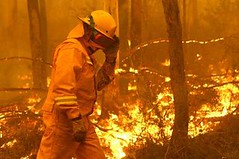
I hope these sites are useful! If you know of any others, please comment. The image of the fire above was taken from d200dug on Flickr.

Monday, February 16, 2009

What Type of Technology Should I Use?

One of the tricky things I am finding at the moment is that there seems to be too many types of technology that I can use in my classroom. I am lucky enough to work at a school that promotes risk taking in using technology in the classroom, as well as the resources to support this. Last weekend I spent 3-4 hours looking at the different options available, and how I would use these options.

However, that was what was what made it so confusing. I want to use technology in the classroom, however I want to use it effectively. I want it to be a tool to enhance both student learning and my teaching. I want to use it to develop rich and rewarding tasks and activities. What I don't want it to be is an add-on. A GLAT (gosh, look at that) use of technology with no real outcome at the end. And this is why I did need to spend so much time looking at the use of technology in my teaching.

I eventually decided to work a little bit with trial and error, as well as limit the applications to one at a time. I designed a blog for all my classes, as this allows me to provide an overview of each lesson, add links and it also allows students to add comments. Each of my classes will work to create a class wiki and this will become our main resource for reference and revision. (The school does not use textbooks). And finally, I will definitely be using applications such as Keynote, iMovie, ComicLife and mapping applications (Google Earth, Google Maps and possibly other software) in each of my lessons. My classroom blog can be accessed by clicking the following link - Bec's Classes.


If any of this becomes confusing or is not helping my students learning I will be the first to know. As stated by David Nettelbeck in Computers, Thinking and Learning, "the best ideas get nowhere unless they can be applied, and our most critical audience is always our students".

Something we must remember as teachers is that change is happening all the time, and we must attempt to keep up. This may require a little bit of effort (for me, most of last weekend), however the rewards will be in my teaching. The You Tube below is called 'Shift Happens' and provides an excellent explanation for us all on the exponential nature of change or 'shift' that is currently occurring. This in itself should be a clear indication that any use of technology, however small but effective, is better than nothing.


I wonder if things were this tricky when technology went from chalk and a slate board to pencil and paper....

Image taken from rutty on flickr.

Sunday, February 8, 2009

Google Ocean

Well, it has been a little while since I last posted. I have just started teaching three new subjects (of which all are senior school) at a great new school and I am taking a little bit of time to get my head around it all. I am working with a great bunch of very innovative teachers and students who are definitely keeping me on my toes. Great for this blog as I have plenty of new entries.

Despite having my nose to the grindstone, there was no way that I could miss the launch of Google Ocean earlier this week. This is the latest addition to Google Earth and Google Sky and involves the new installation of Google 5.0. It hit the news with gusto, and articles such as 'Google Earth upgrade opens oceans of possibilities' by Globeandmail.com provide an in-depth overview on what the new application can do.

Basically, in Google Ocean you can dive beneath the surface and visit the deepest parts of the ocean. It also allows you to explore the ocean with marine experts, and learn about ocean observations (including data on climate change and endangered species). Below is the You Tube launch movie, starring Sylvia Earle (Oceanographer). She is also speaking at this years TED conference.


This is once again a great addition to the geography teachers toolbox. Teaching anything from weather to climate change to endangered species to natural hazards involves various images of the oceans. Now this is available Google Earth style. All I can say, is have fun playing, and don't forget to try out the diving application.